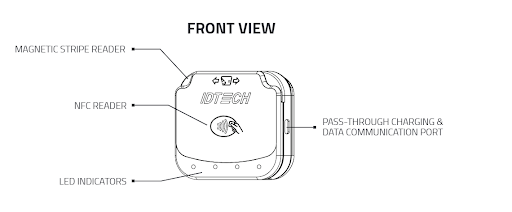
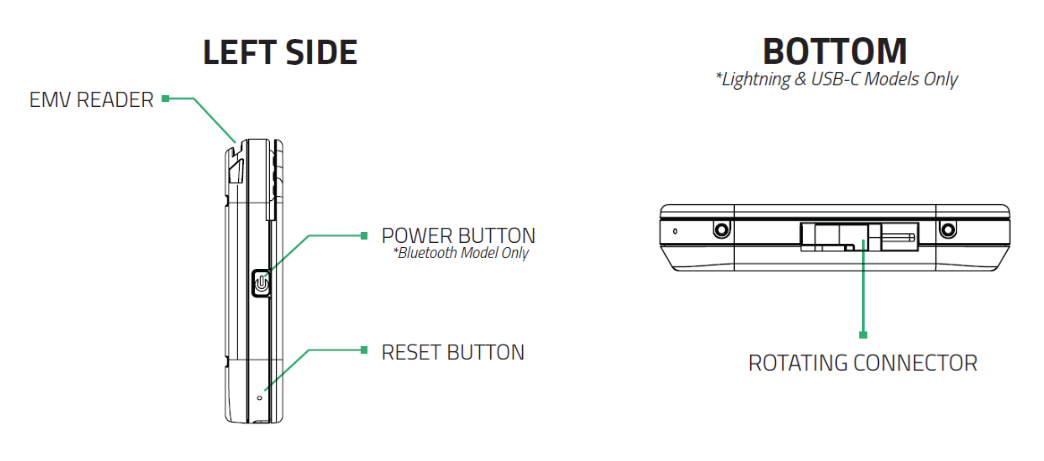
Troubleshooting Guide: IDTech VP3350 Credit Card Reader
1. Device Not Powering On
Possible Causes:
- Battery is depleted (if applicable).
- Faulty or disconnected power source.
- USB port or cable issues.
Solutions:
- Ensure the device is properly connected to a power source.
- Try a different USB cable and/or power adapter.
- If this device is connected directly to the station, the cable may need to be reseated from the reader or motherboard.
- If using a battery-powered model, ensure the battery is charged.
2. Device Not Connecting to POS System
Possible Causes:
- USB connection failure.
- POS system settings misconfigured.
Solutions:
- Restart the the POS station.
- Reseat the USB cable from the reader/station.
- Verify the POS Device has a Payment Device setup with the following setting:
- Sec Device ID: EMV Vp3350 Datacap
- Mode: Production
- Interface: USB
- Manufacturer: IDTech
- Model: VP3350
3. Card Not Reading
Possible Causes:
- Dirty or damaged card reader.
- Card is damaged or improperly inserted.
- Contactless reader obstruction.
- Not holding the card on the device long enough for contactless reading.
Solutions:
- Clean the card reader slot with a swipe reader cleaning card.
- Verify that the card is inserted correctly (chip-first, facing the correct direction).
- Test with another card to determine if the issue is card-related.
- Ensure there are no obstructions around the contactless reader area.
4. Transaction Not Processing
Possible Causes:
- Internet or network connectivity issues.
- Payment processor downtime.
- Expired or blocked card.
- Other processor or merchant account specific errors.
Solutions:
- Try processing another transaction with a different card.
- Check network connections and restart the router if needed.
- Contact your payment processor to confirm system status.
5. Display or Indicator Light Issues
Possible Causes:
- Device software error.
- Faulty display or LED indicators.
Solutions:
- Restart the device.
- Check for error codes and refer to the user manual.
- If indicators are unresponsive, contact IDTech support for further assistance.
LED Indicator Meanings:
- Solid Green: Device is powered on and operational.
- Flashing Green: Device is in standby mode or waiting for a card input.
- Solid Red: Device error or failed transaction.
-
Flashing Red: Device requires attention or tampered (e.g., firmware update needed).
- For more information on tampered devices: Protecting Your Payments: Understanding VP3350 Card Reader Tamper Alerts
- Solid Blue: Bluetooth connection established.
- Flashing Blue: Bluetooth pairing mode active.
- Solid Yellow: Processing a transaction.
- Flashing Yellow: Communication issue detected.
6. General Maintenance and Best Practices
- Regularly clean the device to prevent dust and debris buildup.
- Keep firmware and software updated to avoid compatibility issues.
- Use approved power adapters and cables to prevent damage.
- Store the device in a secure and dry environment when not in use.
7. Supported Models
- NX supports the SRED model of the VP3350 (IDMR-SUF93).
- Non-SRED models (IDMR-NUR93) are not supported.
For further assistance, please refer to the IDTech support website or contact customer service.
https://idtechproducts.com/products/vp3350/